Why Most People Search for a Desktop Habit Tracker
Here's the problem nobody talks about: most habit tracking apps are built for phones.
You set up your routines on a tiny screen, get pushed a notification at an inconvenient time, and then you're supposed to check in from the same phone that's already full of distractions.
But if you're a developer, analyst, writer, student, or anyone who spends six-plus hours a day at a computer — your phone is not your primary device. Your desk is.
A habit tracker that lives on your desktop (or works as a web app in your browser) fits that reality. No context-switching. No fishing for your phone. You review your habits the same way you review your calendar, email, and task list: from the screen in front of you.
What "Desktop Habit Tracker" Actually Means
When people search for a desktop habit tracker, they typically mean one of three things:
- A web app accessible from any browser (the most flexible option)
- A macOS/Windows native app installable on the computer
- A browser extension that overlays habit reminders on new tabs
Of the three, web apps are almost always the best choice for long-term use — and here's why.
Why Web Apps Beat Native Desktop Apps for Habit Tracking
1. Cross-device access without syncing headaches. A web app works on your work laptop, home desktop, and school computer without installation or sync issues. Native desktop apps often require paid licenses per device or awkward cloud sync setups.
2. No installation, no updates. Web apps update silently in the background. You never deal with version mismatches or update prompts interrupting your workflow.
3. Works alongside mobile when you need it. The best web-based habit trackers are responsive — meaning you can check in from your phone when you're away from your desk, but your default workflow is browser-based.
4. Better data persistence. A native app tied to one computer is vulnerable: hard drive failure, new laptop purchase, or OS reinstall can wipe your history. Web apps store your data server-side.
5. Integrates naturally into your existing browser workflow. If you live in browser tabs — and most desktop workers do — a web app habit tracker is already where you are. No app switching required.
The Real Problem With Mobile-Only Habit Trackers for Desktop Workers
Mobile habit trackers assume your phone is always nearby and that push notifications are welcome interruptions. For many people, neither is true.
If you're deep in a coding session, a writing flow, or a video call, a phone notification is costly — research from Gloria Mark at UC Irvine found it takes an average of 23 minutes to fully regain focus after an interruption.
The better workflow: check your habits when you naturally have a moment — at the start of your day, during a lunch break, or at end-of-day when you're wrapping up work. That moment happens at your desk. Your habit tracker should be there too.
Comparing the Best Desktop Habit Trackers (Web-Based)
| App | Works in Browser | No Streak Pressure | Journal/Notes | Free Plan | Best For |
|---|---|---|---|---|---|
| CheckHabit | ✅ Full web app | ✅ Pattern-based | ✅ Daily journal | ✅ 5 habits | Desktop-first professionals |
| Habitify | ✅ Web dashboard | 🟡 Optional streaks | ❌ No | 🟡 Limited | Cross-platform power users |
| Notion (custom) | ✅ Full web app | ✅ No streaks | ✅ Full notes | ✅ Yes | DIY / flexible |
| Streaks | ❌ iOS/macOS only | ❌ Streak-focused | ❌ No | ❌ Paid | Apple ecosystem users |
| Loop Habit Tracker | ❌ Android only | 🟡 Strength score | ❌ No | ✅ Full | Android-only users |
The pattern is clear: if you want a habit tracker that works well in a browser, your choices narrow quickly. Most popular apps are mobile-first by design.
What to Look for in a Desktop Habit Tracker
Keyboard-friendly interface. A web app designed for desktop should let you log habits quickly without excessive clicking. Tab navigation and minimal friction matter.
No mandatory mobile onboarding. Some "web" apps still require you to set up on mobile first. Avoid these.
Clear visual data. On a large monitor, you have screen real estate. The best desktop habit trackers use it — showing your consistency map, weekly patterns, and trends at a glance, not just a cramped checklist.
Daily notes or journaling. At your desk, you have a keyboard. Use it. A habit tracker with a daily journal field lets you capture context that pure check-ins miss: why today's deep work session was productive, or why you skipped the evening walk.
No streak pressure. Streaks create anxiety whether you're on mobile or desktop. A pattern-based tracker shows your consistency without making one missed day feel catastrophic.
How CheckHabit Works as a Desktop Habit Tracker
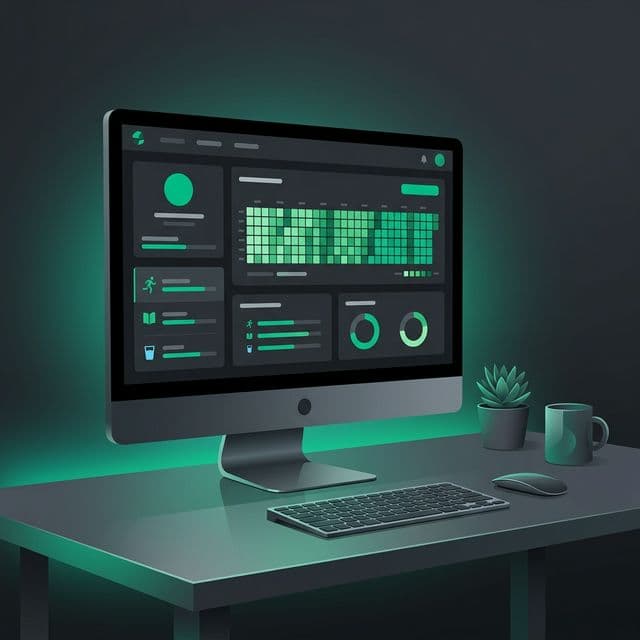
CheckHabit was built to be a browser-first experience. The interface is optimized for wide screens — with a dashboard that shows your habit consistency map, weekly summaries, and daily journal in a layout that makes sense on a monitor.
There's no mobile app required. You create your account, set up your habits, and check in from the browser each day. If you want to log from your phone occasionally, the responsive design handles it — but the primary experience is designed for your desk.
The workflow most CheckHabit users follow:
- Open the dashboard at the start of the work day alongside email and calendar
- Check in on habits you've already completed (morning workout, reading, etc.)
- Leave a brief note if something is worth capturing
- Review your weekly pattern on Sundays as part of a weekly review
That's it. No phone required. No notifications interrupting your focus.
The Bottom Line
If you're a desktop worker looking for a habit tracker, you don't need the most popular mobile app. You need the one that fits how you actually work.
A web-based habit tracker with a clean desktop interface, low friction check-ins, and honest consistency data beats a mobile app with push notifications and streak pressure — for most people who sit at a computer all day.
The best habit tracker is the one you'll actually open. For desktop workers, that means a browser tab — not another app on a phone.